
Welcome to #welcome!
This is the start of the #welcome channel. The ultimate master site and wiki for VOXEL DESTRUCT 2 [EARLY ACCESS].
About the Game
🚧 The game is unfinished and is in PAID EARLY ACCESS. We'll release frequent updates to add more missing features.
💥 Experience some of the best destruction physics on Roblox yet. Unleash your chaos energy and destroy everything in sight. 🏠 From every building, every map, every structure, even the terrain is fully destructible! Supported devices: Mobile, Tablet, Console, Computer, VR.
Roblox Studio Native
Modding is built entirely on standard Roblox infrastructure and Luau. Just drop your files into Workspace or ServerScriptService, set up your ModuleScripts, and start coding immediately.
Secure VM Sandbox
VD2 executes your scripts in a custom, sandboxed Luau Virtual Machine.
Master Wiki
Community-driven encyclopedia.
VOXEL DESTRUCT 2
VOXEL DESTRUCT 2 is an Early Access game developed by whatever_dev() focusing on highly advanced destruction physics on the Roblox platform.
Overview
The core premise of the game is to unleash chaos. Every building, map structure, and even the terrain itself is fully destructible using a custom Voxel engine that runs efficiently across Mobile, Tablet, Console, PC, and VR devices.
Features
- Softbody physics simulation.
- Dynamic structural integrity (buildings collapse if their supports are destroyed).
- Extensive Modding API via vd2-libstan.
Team & Staff
The people that are contributing to the game.

Danny
Creator & Lead DeveloperThe mastermind behind Voxel Destruct 2 and the destruction physics engine.

bottlefork
Creator of LibforkWeb developer and founder of Libfork.
Getting Started with Modding
Welcome! Here are the fundamentals of VD2 mod creation in Roblox Studio.
Where do mods load?
When a server starts, VD2 imports your entire mod package directly into game.ServerScriptService.ModsEntryPoint. Your Activate() function runs on load, and Uninstall() runs upon removal.
You must use modern Luau standards. The index.lua ModuleScript must NOT yield on require.
Script Mods
Custom weapons, UIs, mechanics. Create a folder with index.lua.
-
 MyCoolMod
-
-
 index.lua -- (Required)
-
 serverLogic.lua
-
Assets
-
Map Mods
Custom destructible arenas. Requires a Map folder and MetaData.
Map Modding Guide
Architect destructible environments.
1. Roblox Tags & Attributes (Physics)
DestructiveGroup (Tag)
Makes Model destructible. Unanchors parts inside.
RF:Anchor (Part Name)
Rename bottom part to stick it to the ground.
__genericGlass1/2 (Attr)
String. Shatters part. playSound:glassShatter.medium,fragmentSize:3,voxelSize:1
__genericBomb1 (Attr)
String. Explodes on hit. size:10,damage:15,pressure:100
__t [Toughness] (Attr)
Number. Armor HP. 10-25 for bullets, 30-50 for rockets.
2. Map Geometry & Zones
Terrain / RobloxTerrain
Static ground skips physics. Parts named "Water" turn to liquid.
AmbienceZones
Invisible parts with SoundAssetId string (e.g., wasset://vd2.sounds...).
MapBarriers
Invisible borders. Effect generates on Front Face of the Part.
3. MetaData
return {
    Name = "Gas Station Map",
    Version = 1.0,
    SupportedGamemodes = { "sandbox" }
}
4. Folder Structure
-
GasStationMod
-
-
Map
-
-
Area1 -- (Required!)
-
-
SpawnLocations
-
-
Terrain
-
AmbienceZones
-
MapBarriers
-
-
MetaData
-
index
-
index.lua Manifest
return {
    Name = "My Mod",
    Dependencies = { "vd2-libstan" }, -- Auto-installs API

    Activate = function()
        print("Loaded!")
    end,

    Uninstall = function()
        print("Removed!")
    end,

    Actions = {
        {
            UniqueId = "btn_1",
            Text = "Click",
            OnClick = function(p) end
        }
    }
}
Core API (vd2libstan)
local libstan = require(game.ReplicatedStorage:WaitForChild("vd2libstan", math.huge))

local Bomb = libstan.ServerV1().GraceDestructionEngine.GenericDestructor(1, 10, nil)
Bomb.DynamicExplode(Vector3.new(0, 0, 0), 1000)
Deploying your Mod
How to get your creations from Studio into the live game.
Save to File
Save your Mod Folder as an .rbxm format directly from your Roblox Studio Workspace.
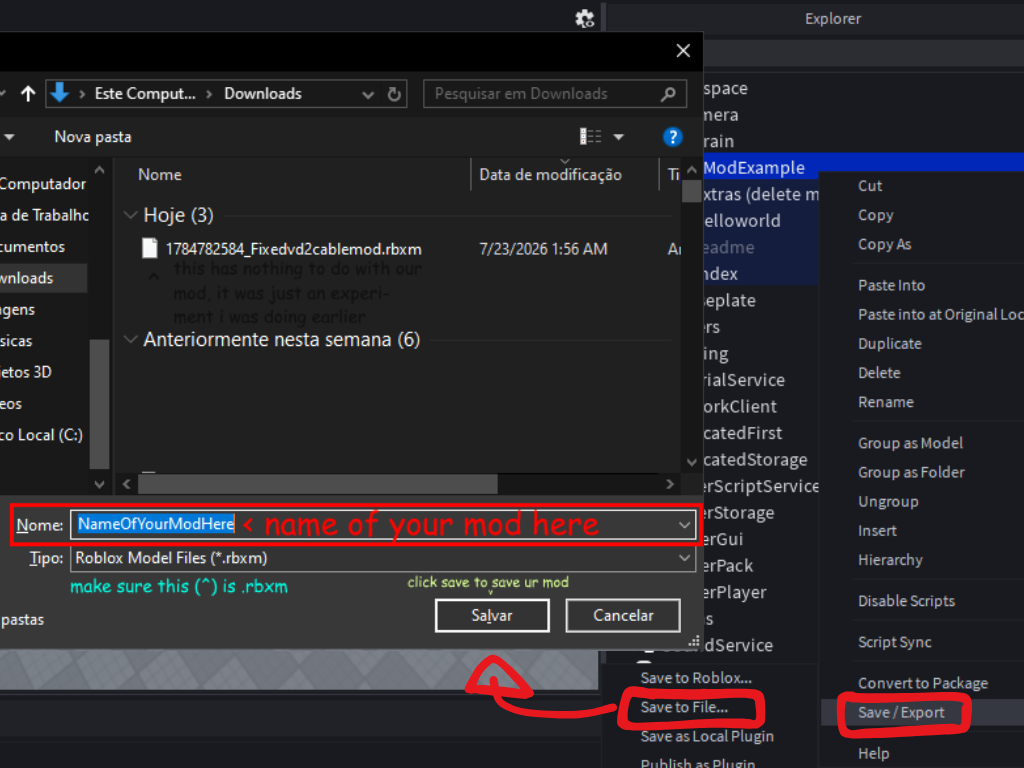 Example Image
Upload to Hub
Authenticate via Discord and upload your file securely to the Mod Console tab.
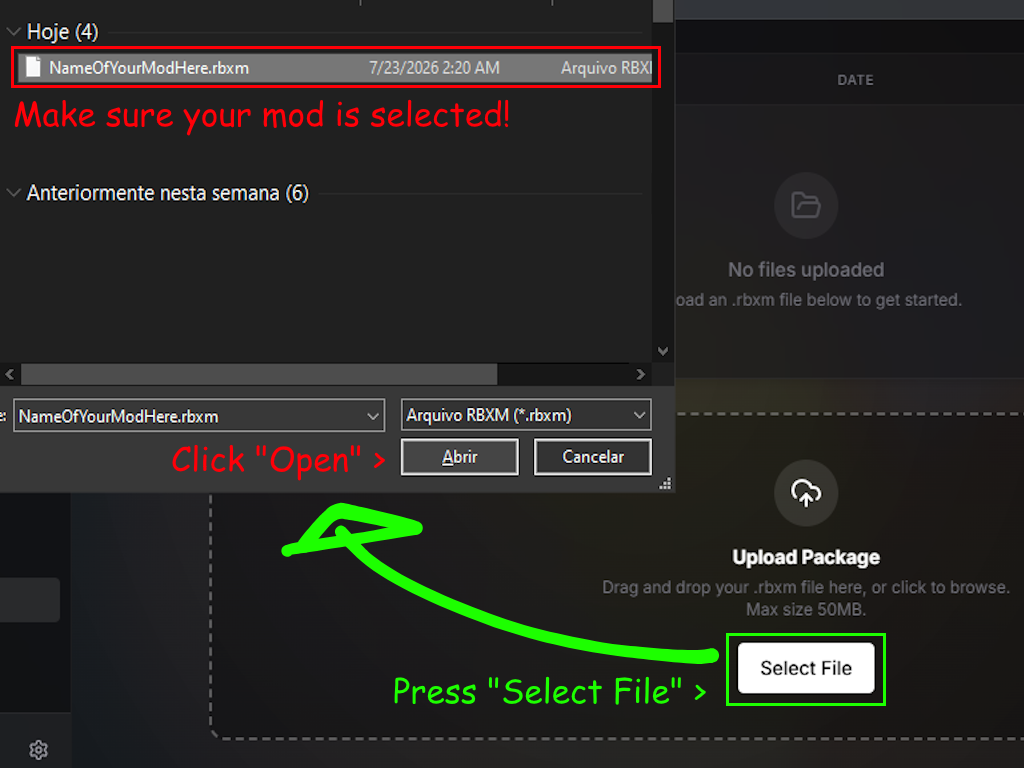 Example Image
Load & Play
Copy the generated URL from the hub and paste it directly into the VD2 Host Panel.
 Example Image
Starter Templates
Working Door Model
Pre-rigged with HingeConstraints. Ready to place in walls.
Click to Download
Get the .rbxm file immediately.
Elevator Model
Functional script, sounds, and buttons included.
Click to Download
Get the .rbxm file immediately.
Script Mod Base
Folder with manifest & dependencies pre-configured.
Click to Download
Get the .rbxm file immediately.
Map Mod Base
Correct folder hierarchy for maps (Area1, MapBarriers, etc).
Click to Download
Get the .rbxm file immediately.
My Account
Not Logged In
Discord Authentication